


Braio

Social Manager

Social Manager: From a website address to finished posts.

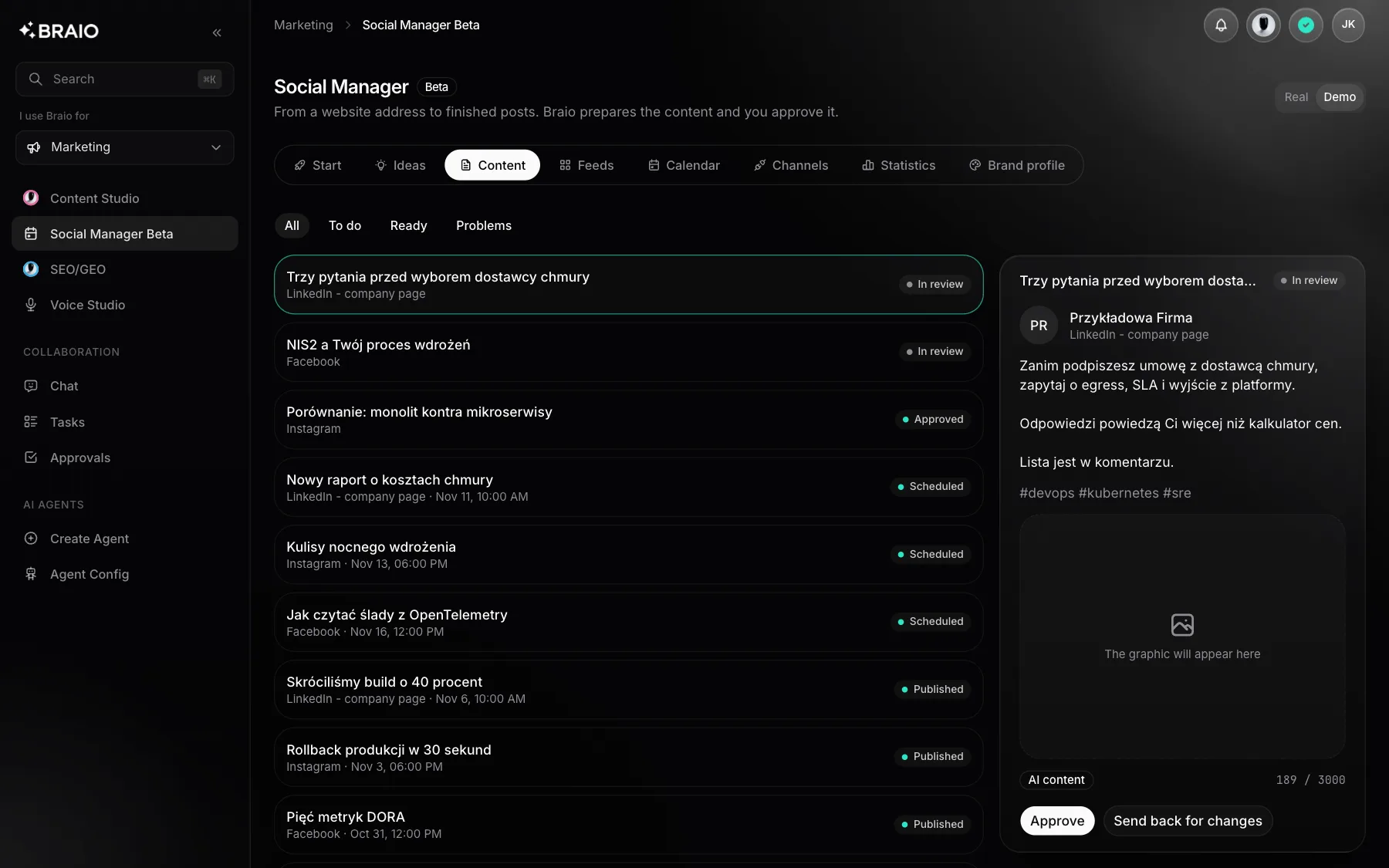
You give it your website address. Braio learns your brand, proposes topics, writes posts and creates graphics in your colors. You approve them and publish to Instagram, Facebook and LinkedIn.

The Braio panel with sample data: Social Manager

See what you get

Sample requests and results on demonstration data.

What the work looks like

A preview on sample data.

Learn our brand from yourcompany.com

Brand profile

Tone
Factual and technical
Logo
Found on the site
Status
Waiting for approval

A brand profile from your website

Braio reads the site and records what it found, marking where each value came from.

  • Company, offer and tone of voice
  • Colors, fonts and logo
  • You approve the profile before the first post

Write a post about choosing an IT delivery model

LinkedIn post

Graphic
In brand colors, 3:2
Approval
Approved
Publishing
Tuesday, 9:00

A post and graphic for every channel

One topic becomes separate versions, and a graphic takes one click.

  • Copy written for the specific network
  • A graphic from a template or your own image
  • A wall preview before publishing

From a website address to publishing

There is no brief to fill in. The starting point is what your company already says about itself on its site.

  1. 1

    You enter your company's website address.

  2. 2

    Braio reads the site and builds a brand profile: company, offer, tone of voice, colors, fonts and logo.

  3. 3

    You correct the profile and approve it. Each value is marked as found on the site or inferred.

  4. 4

    Braio proposes topics that fit the profile and writes a separate post for each channel.

  5. 5

    One click creates an on-brand graphic.

  6. 6

    You approve the post, then publish it right away or schedule it on the calendar.

An on-brand graphic in one click

A post, banner, statement or diagram template takes the colors, typography and logo from your brand profile. You can also upload your own image and Braio restyles it for your brand. Instagram gets a 1:1 format, Facebook and LinkedIn 3:2.

See the post before it goes out

The wall preview shows how a post will look on Instagram, Facebook and LinkedIn. You can edit the text until it is published. A changed post returns to draft and goes through approval again.

Nothing goes out without your approval

A post can only be published once approved. You connect accounts on Facebook's or LinkedIn's own page: Braio never sees your password and keeps its publishing access encrypted. If a network does not confirm a publication, Braio does not retry on its own and asks you to check, so the same post cannot go out twice.

Where to start

Enter your website address and review the brand profile. Want to see the module without your own content first? Demo mode shows it on sample data.

Questions and answers

Write to us

No. A post can only be published once approved, and any change to the text returns it to draft.

From your website. You correct and approve the brand profile before the first post is written.
Yes. You upload an image and Braio creates a graphic from it in your brand's style.

A Facebook Page, a business Instagram account linked to that Page, a LinkedIn profile and a LinkedIn company page.

Generating copy and graphics uses credits from your organization's pool.

Other products

Chat

Explore

AI agents that know your company, data and processes.

Build

Explore

Agents plan the work, write code and open pull requests.

QA AI Automation

Explore

An agent tests your app and collects bug evidence.

Content Studio

Explore

Images, video and campaign copy in one place.

Voice

Explore

Voice assistants that handle phone conversations.

SEO/GEO Audits

Explore

A report on how ready your site is for search and AI tools.